
MTD Deadline 7 August 2026: What UK Landlords Must File Now

Published · Updated · 5 min read
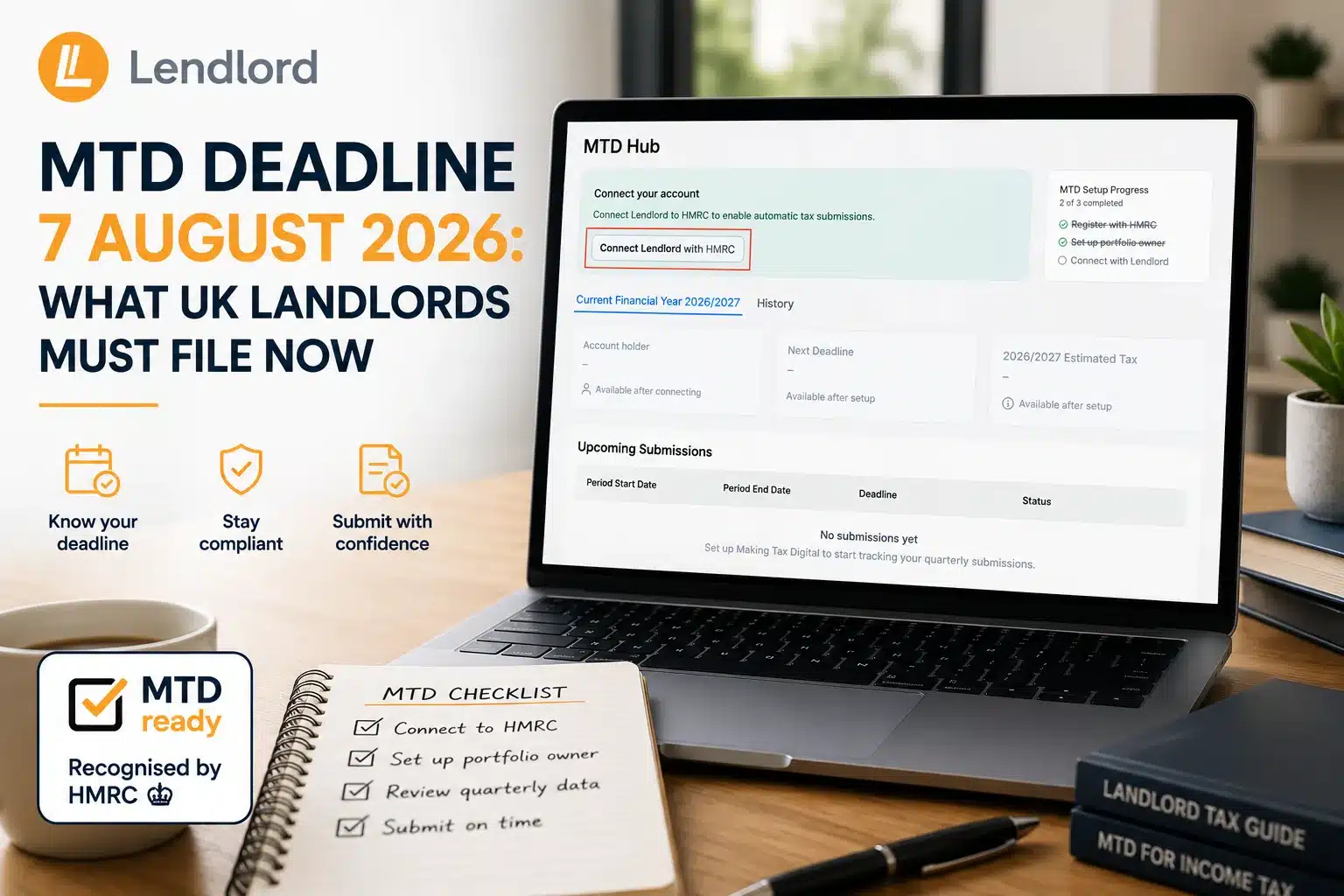
MTD Deadline 7 August 2026: What UK Landlords Must File Now

Phase 1 UK landlords must file the first Making Tax Digital quarterly update by 7 August 2026 for 6 April to 5 July. Open the Lendlord MTD Hub, confirm HMRC registration, verify the portfolio owner, connect to HMRC, choose the period, confirm mortgage interest, then review and Submit.

If you searched for the MTD deadline 7 August 2026 or what landlords must file now, this guide walks the full Lendlord MTD Hub path. You will see every key screen from registration to Submit, aligned with the official Help Center steps.

At a glance

  • Deadline: 7 August 2026 for Q1 (6 April to 5 July).
  • Where: Manage → Accounting → MTD Hub.
  • Setup: HMRC registration, portfolio owner, NINO check, HMRC connection.
  • File: Submit Now → mortgage interest category → review → Submit.
  • Rule: One team member submits per Lendlord account.

MTD Hub

Open your tax-ready workspace before 7 August
Mtd Hub By Lendlord
MTD Hub by Lendlord for quarterly updates.

Use HMRC-recognised MTD-compatible software to keep digital records and submit the first quarterly update from one place.

Explore MTD Hub
MTD Hub by Lendlord for quarterly updates.

What the 7 August 2026 deadline means

Phase 1 landlords (qualifying gross income over £50,000) must send the first Making Tax Digital quarterly update by 7 August 2026. That file covers 6 April to 5 July. It is a summary from your digital records, not a full tax bill and not a stack of invoice PDFs.

Later 2026/27 deadlines are 7 November 2026, 7 February 2027, and 7 May 2027. You still complete year-end obligations by 31 January after the tax year. Soft tip: finish Q1 records first, then use the MTD Hub screens below to file.

The walkthrough matches Lendlord’s Help Center guide: How to Submit Your Quarterly Updates with Lendlord’s MTD Hub. Prefer to watch first? Use the how-to video and webinar below, then follow the screenshots step by step.

Watch: MTD Hub quarterly submit walkthrough

Full walkthrough of connecting Lendlord to HMRC and submitting a quarterly update.

Get MTD-ready

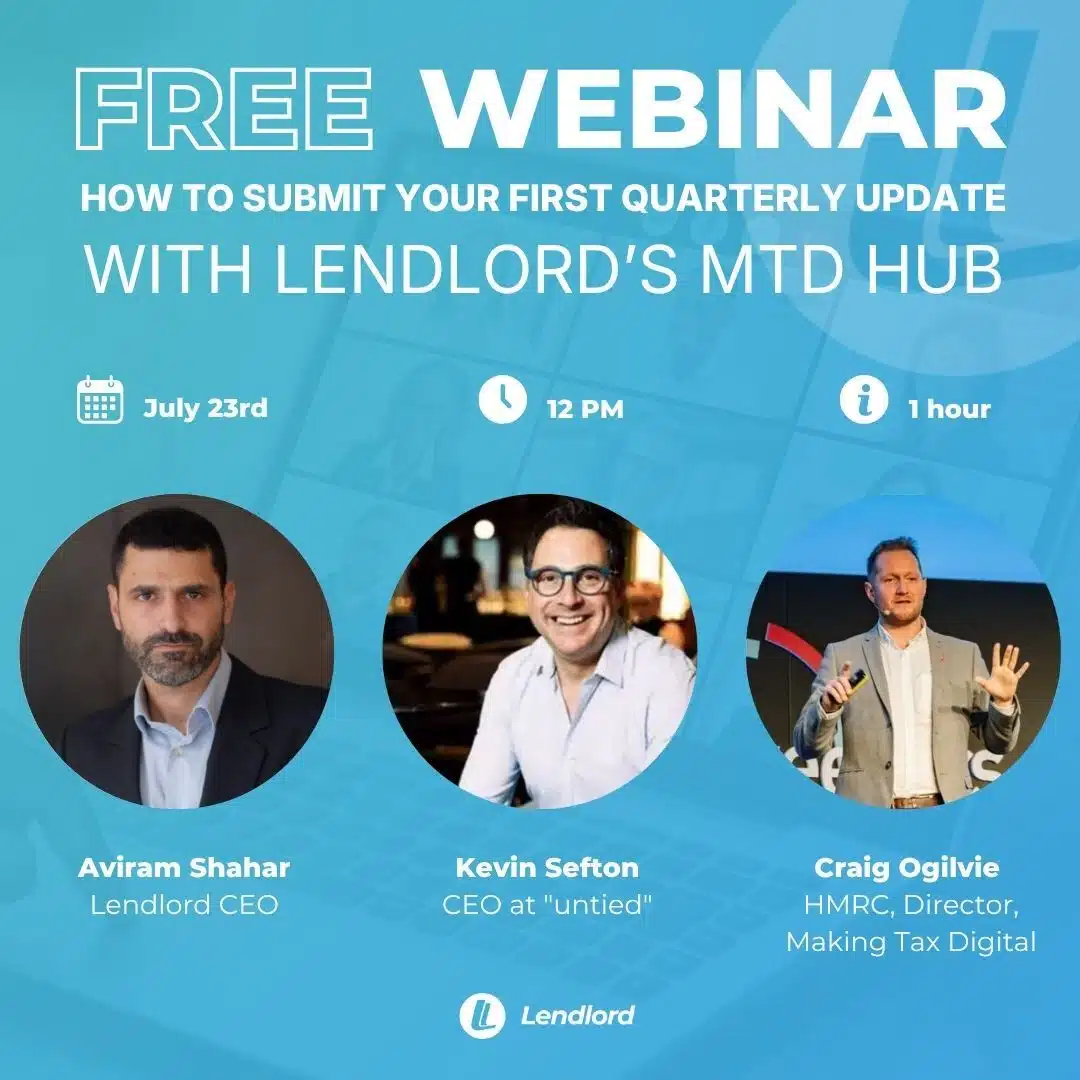
See the first quarterly update submitted live
Upt How To Submit Your First Quarterly Update With Lendlords MTD Hub
Free webinar: submit your first quarterly update with Lendlord’s MTD Hub.

Craig Ogilvie, HMRC Director, will be attending, together with Kevin Sefton, CEO at Untied.

Register for the MTD webinar
Free webinar: submit your first quarterly update with Lendlord’s MTD Hub.

Step 1: Open the MTD Hub

In Lendlord, go to the Manage tab, scroll to Accounting, and open MTD Hub. That is your filing workspace for every quarterly update.

Step 2: Confirm HMRC registration and tax details

Before you continue, register for Making Tax Digital with HMRC and keep your tax details ready, especially your National Insurance number.

Step 3: Click I’ve registered with HMRC

In the MTD Hub setup banner, click I’ve registered with HMRC. If you have not registered yet, finish HMRC sign-up first, then return to Lendlord.
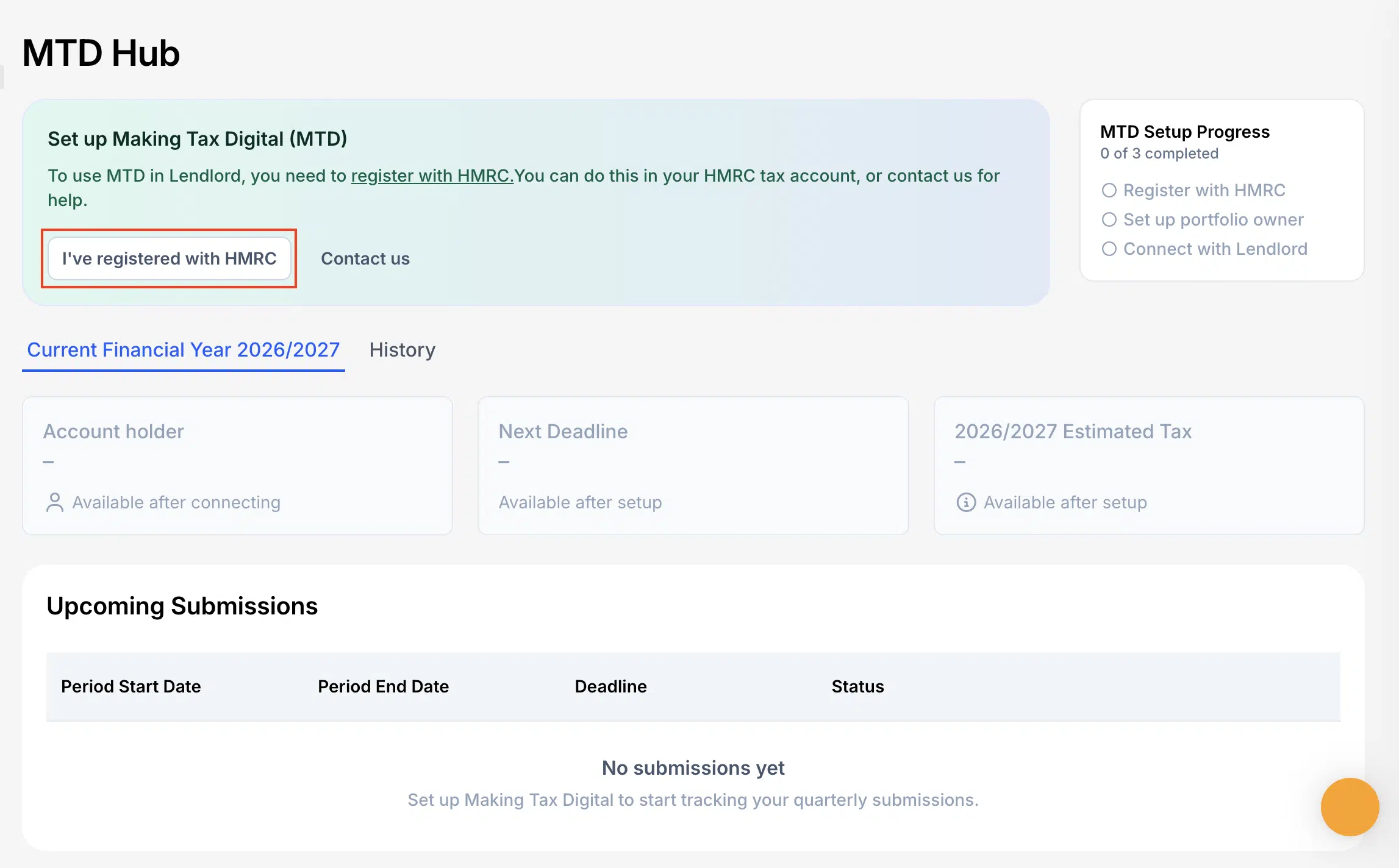
1 Click On Ive Registered With HMRC If You Havent Registered Yet You Will Need To First Register With HMRC And Then Continue The Process On Lendlord
MTD Hub setup: click I’ve registered with HMRC to start.

Short: first quarterly submission deadline 7 August

Quick reminder: Phase 1 landlords must submit the first quarterly update by 7 August.

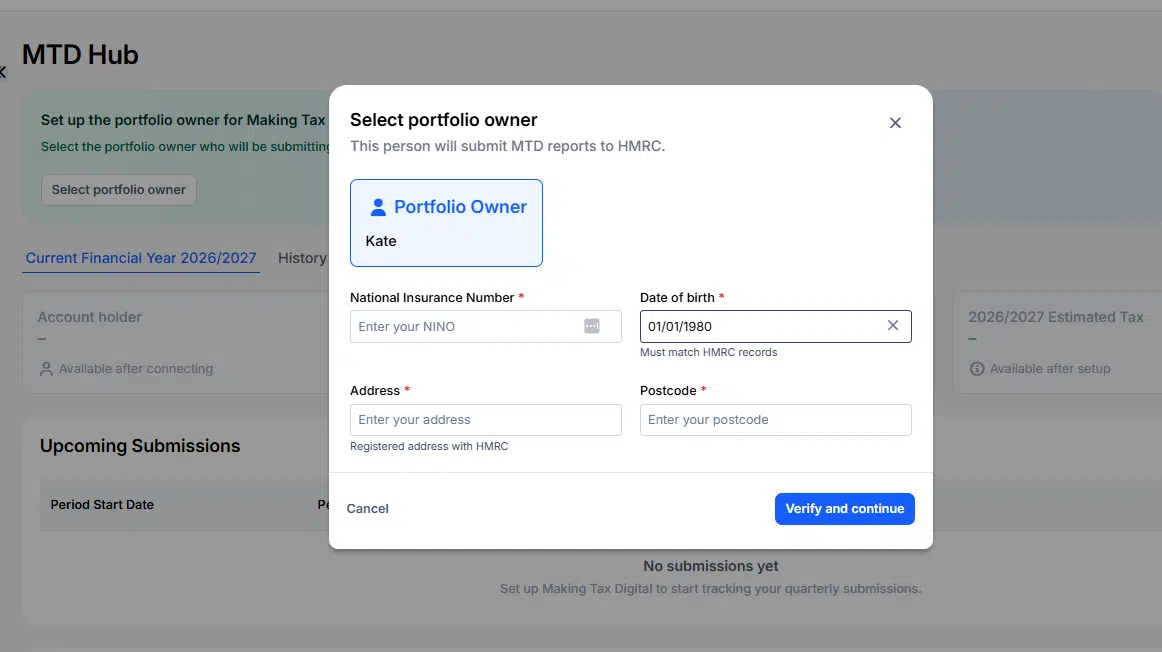
Step 4: Select the portfolio owner

Click Select portfolio owner and choose who the update is for. You can submit for one team member per Lendlord account. Invite other owners and file from their own accounts.
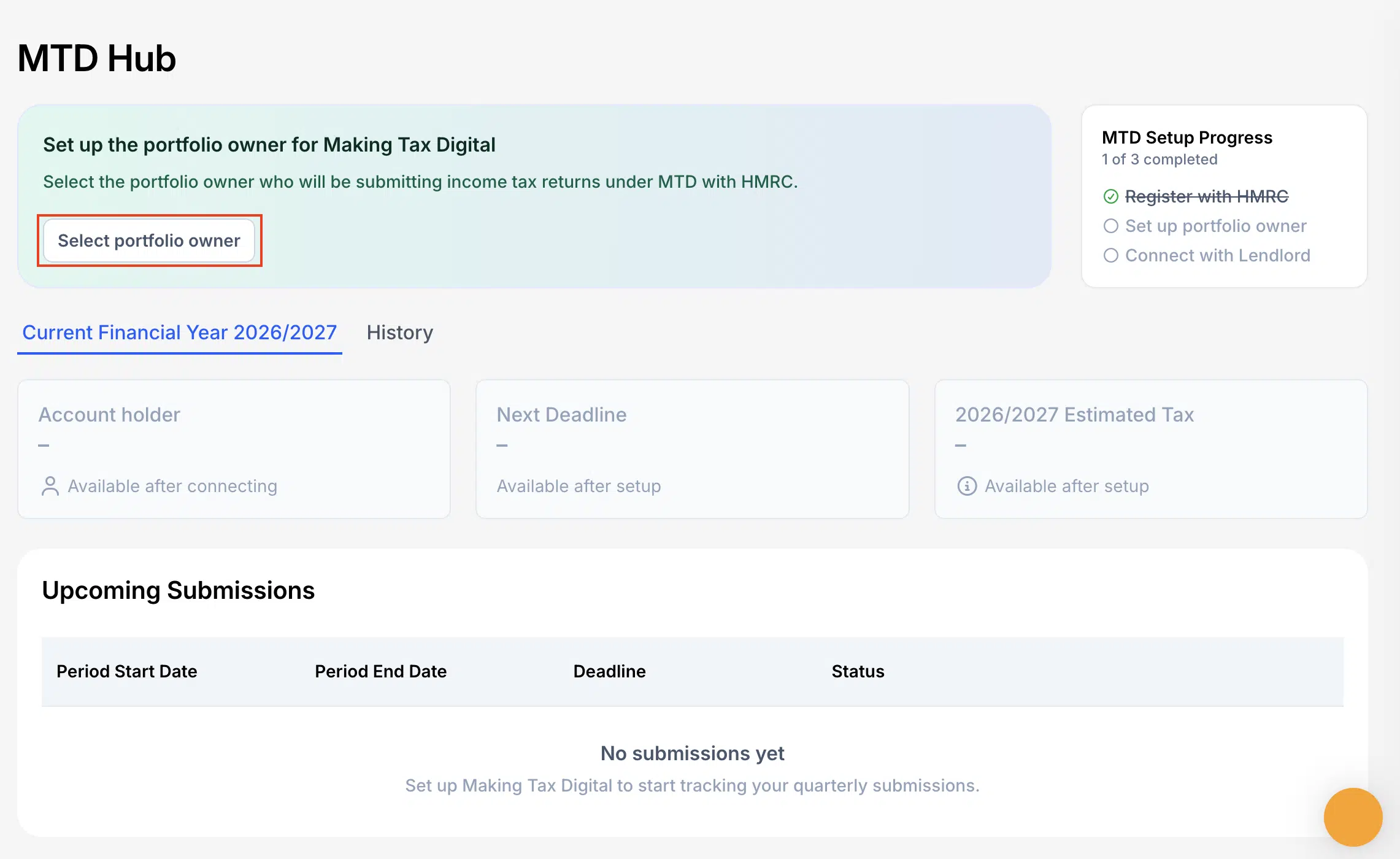
2 Click On Select Portfolio Owner To Choose The Person Youre Submitting The Update For
Select the portfolio owner after HMRC registration is marked complete.

Step 5: Verify NINO and owner details

Check the portfolio owner details carefully. Confirm the National Insurance number matches HMRC records, then click Verify and continue.
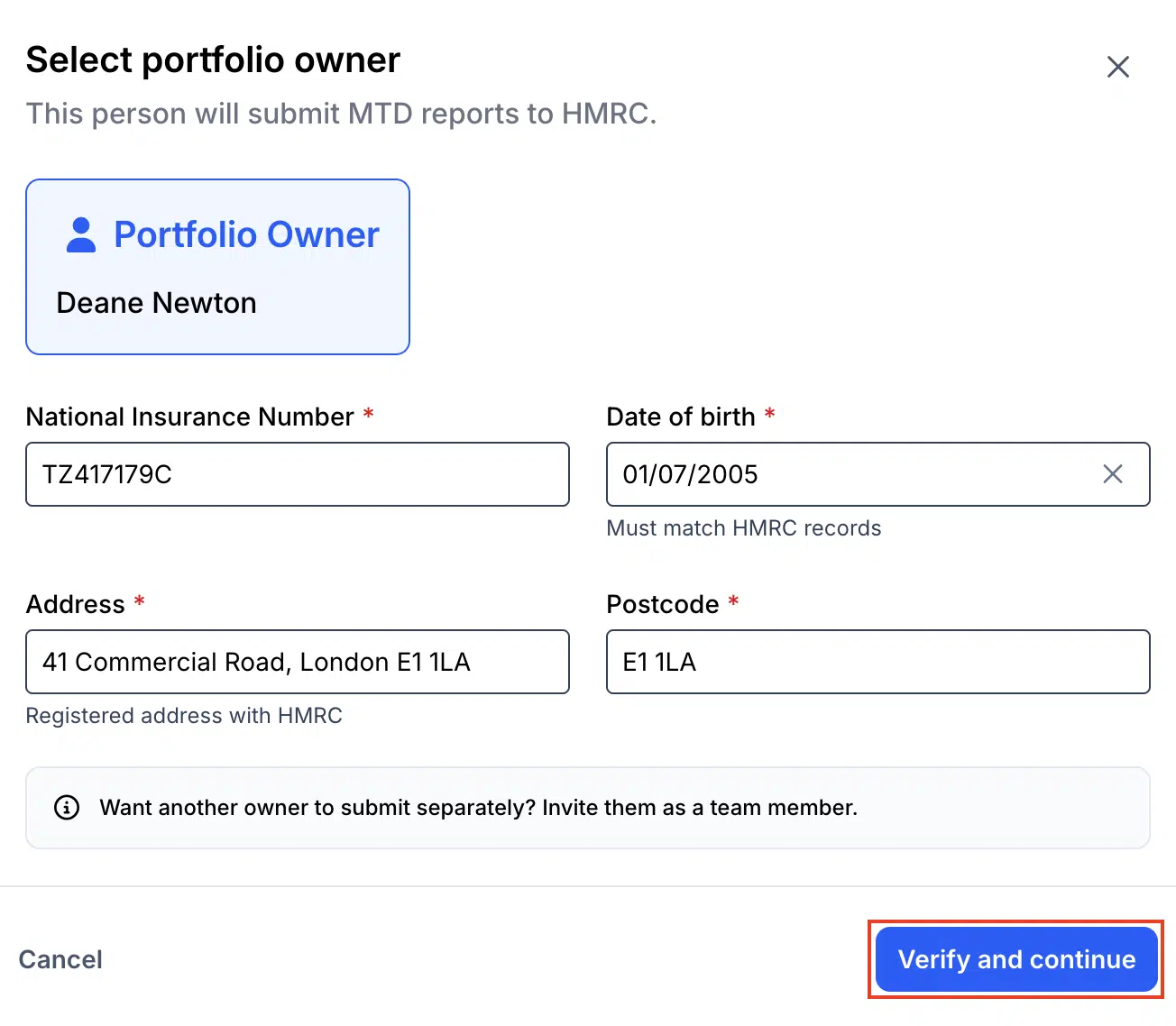
3 Verify The Portfolio Owner Details And Make Sure That The NINO National Insurance Number Is Correct Then Click Verify And Continue
Verify NINO, date of birth, and registered address, then continue.

Step 6: Connect Lendlord with HMRC

Click Connect Lendlord with HMRC. Lendlord sends you to the official HMRC website to authorise the link.
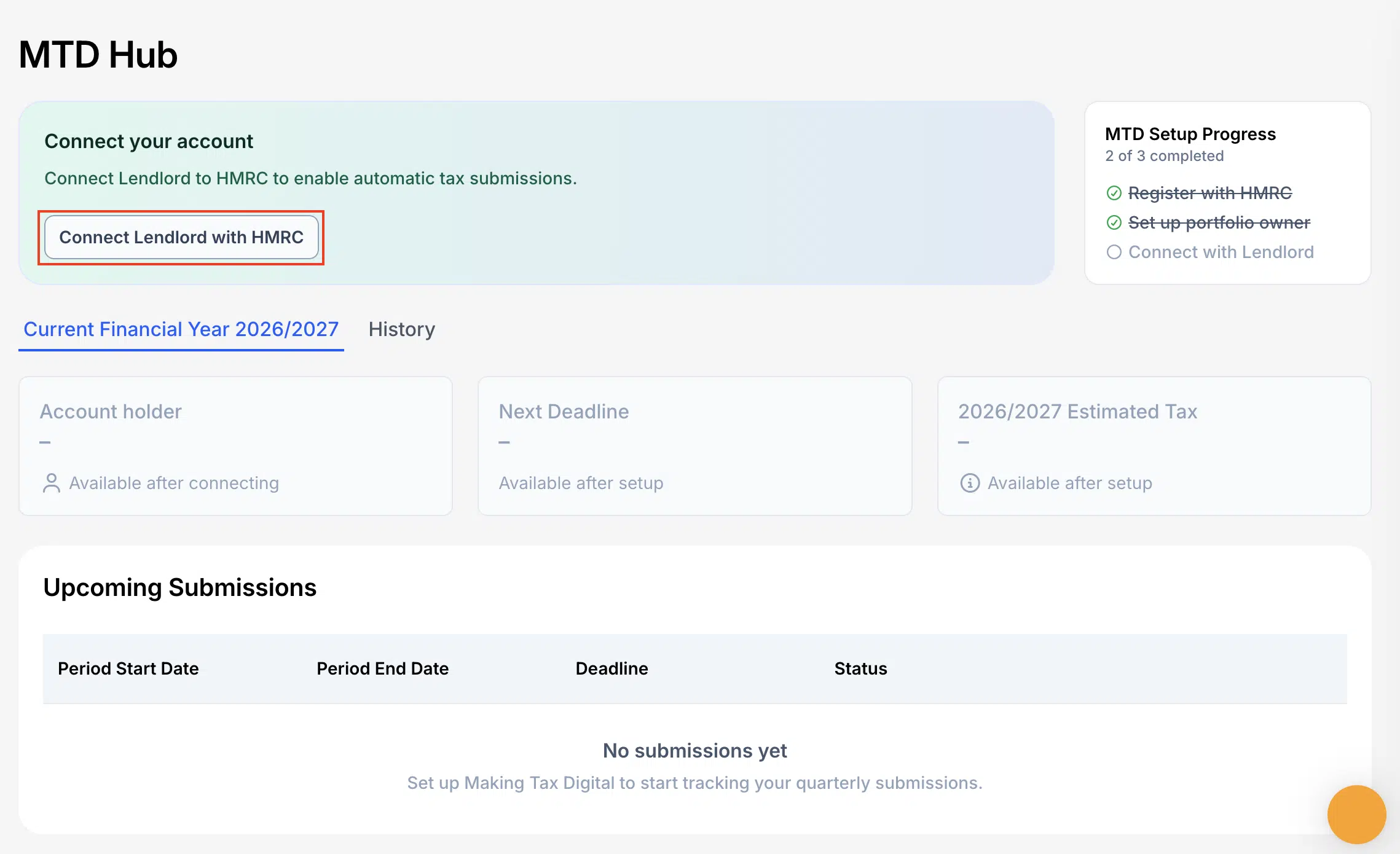
4 Next Click On Connect Lendlord With HMRC This Will Transfer You Over To HMRC Website
Connect your Lendlord account to HMRC to enable submissions.

Step 7: Sign in to the HMRC online service

On the HMRC page, click Sign in to the HMRC online service. Use the correct Government Gateway credentials for that taxpayer.
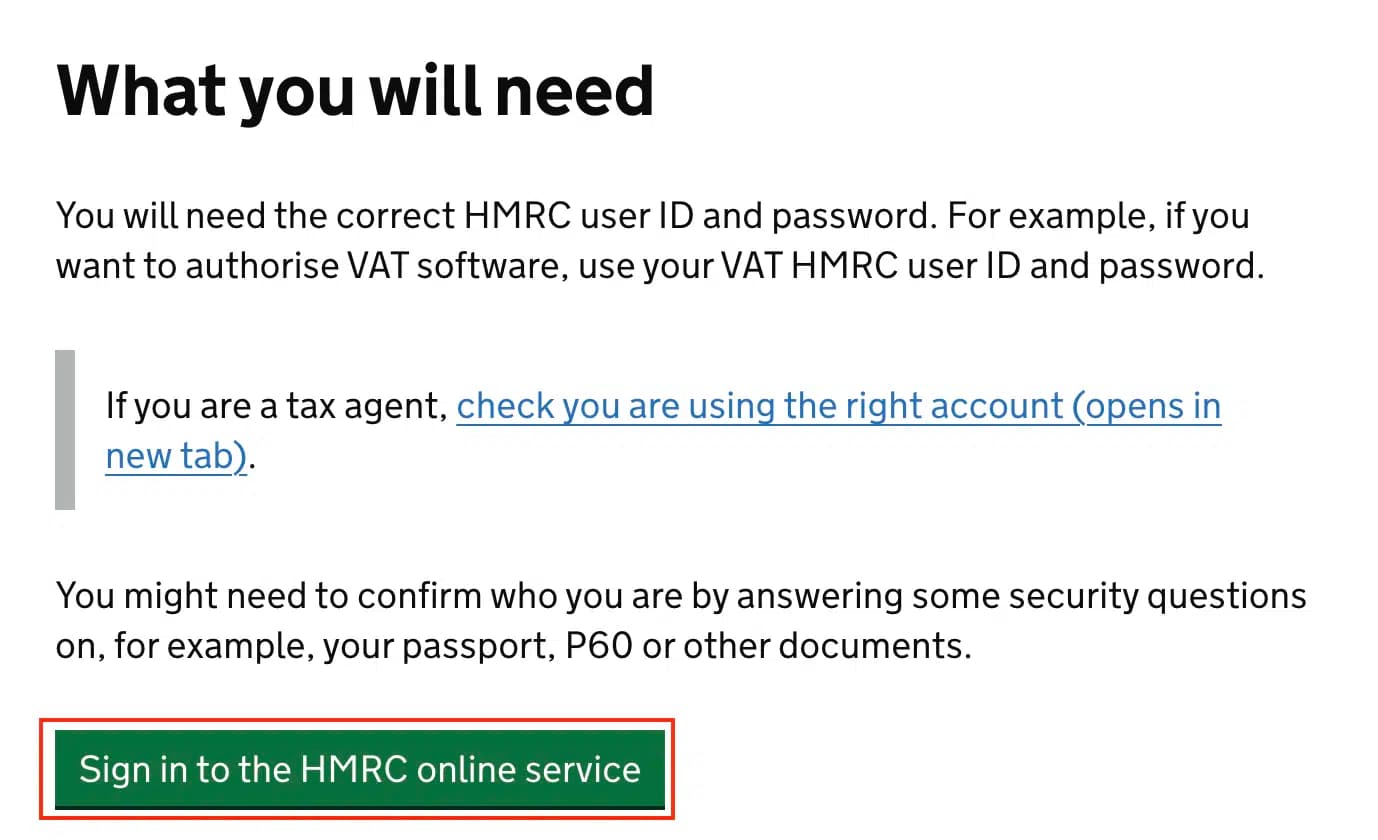
5 Next Click On Sign In To HMRC Online Service
HMRC sign-in entry point after Connect Lendlord with HMRC.

Step 8: Enter your HMRC credentials

Enter your HMRC user ID and password, then click Sign in. (Demo screens may show a test user. Always use your live credentials when filing for real.)
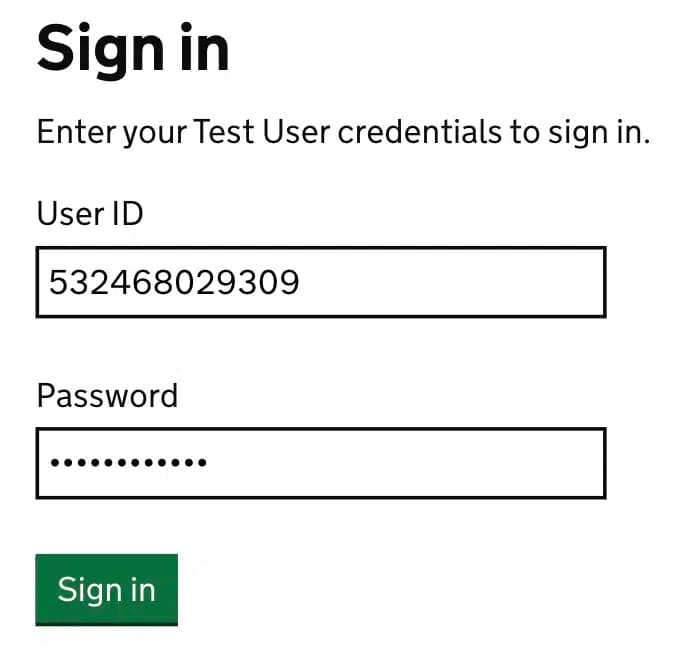
6 Next Enter Your HMRC Details Then Click On Sign In
Sign in with your HMRC credentials to authorise the software link.

Step 9: Give permission for Lendlord to connect

Review the permissions list, then click Give permission so Lendlord can connect with HMRC for Self Assessment information needed for MTD.
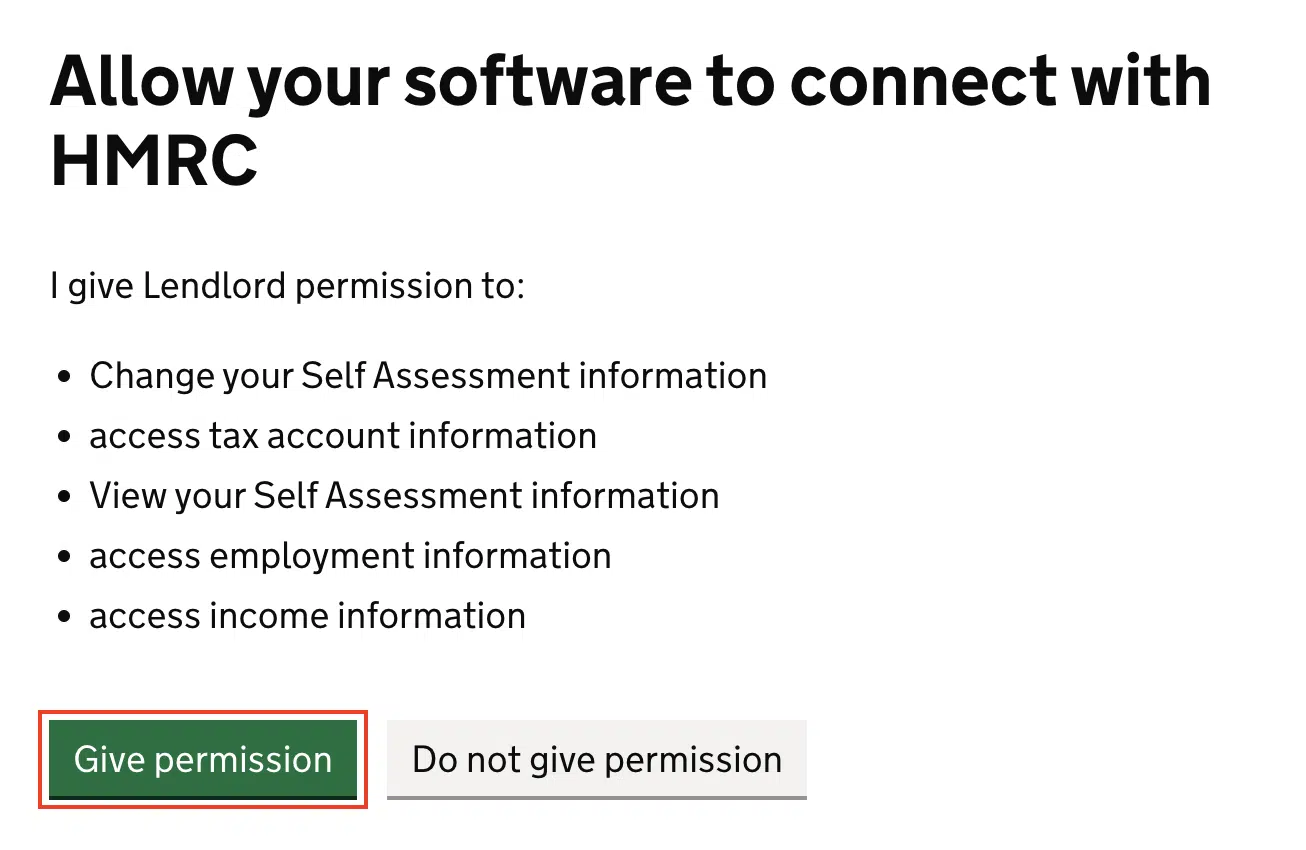
7 Next You Need Give HMRC To Connect To Lendlord Click Give Permission
Give permission so Lendlord can connect with HMRC.

Step 10: Choose the period and click Submit Now

Back in the MTD Hub, open the period you need. For the first 2026/27 update, that is 6 Apr 2026 to 5 Jul 2026, deadline 7 Aug 2026. Click Submit Now.
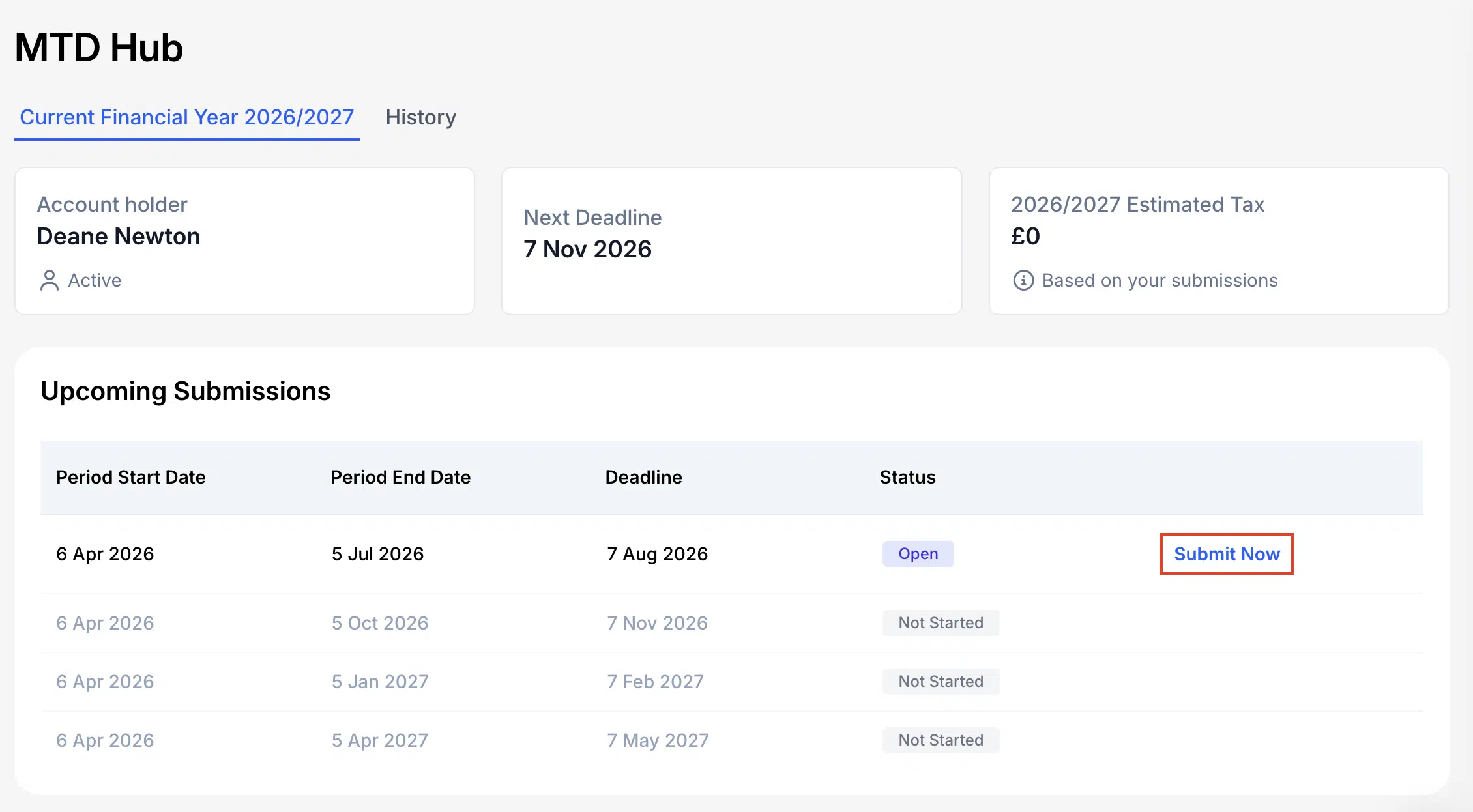
8 Now You Are Ready To Submit Your Quarterly Update Find The Period You Would Like To Submit For And Click Submit Now
Upcoming Submissions shows the 7 August 2026 deadline with Submit Now.

Step 11: Confirm your mortgage interest category

Select the expense category (or categories) that contain mortgage interest, then click Continue. Mortgage interest is identified separately for the tax credit calculation.
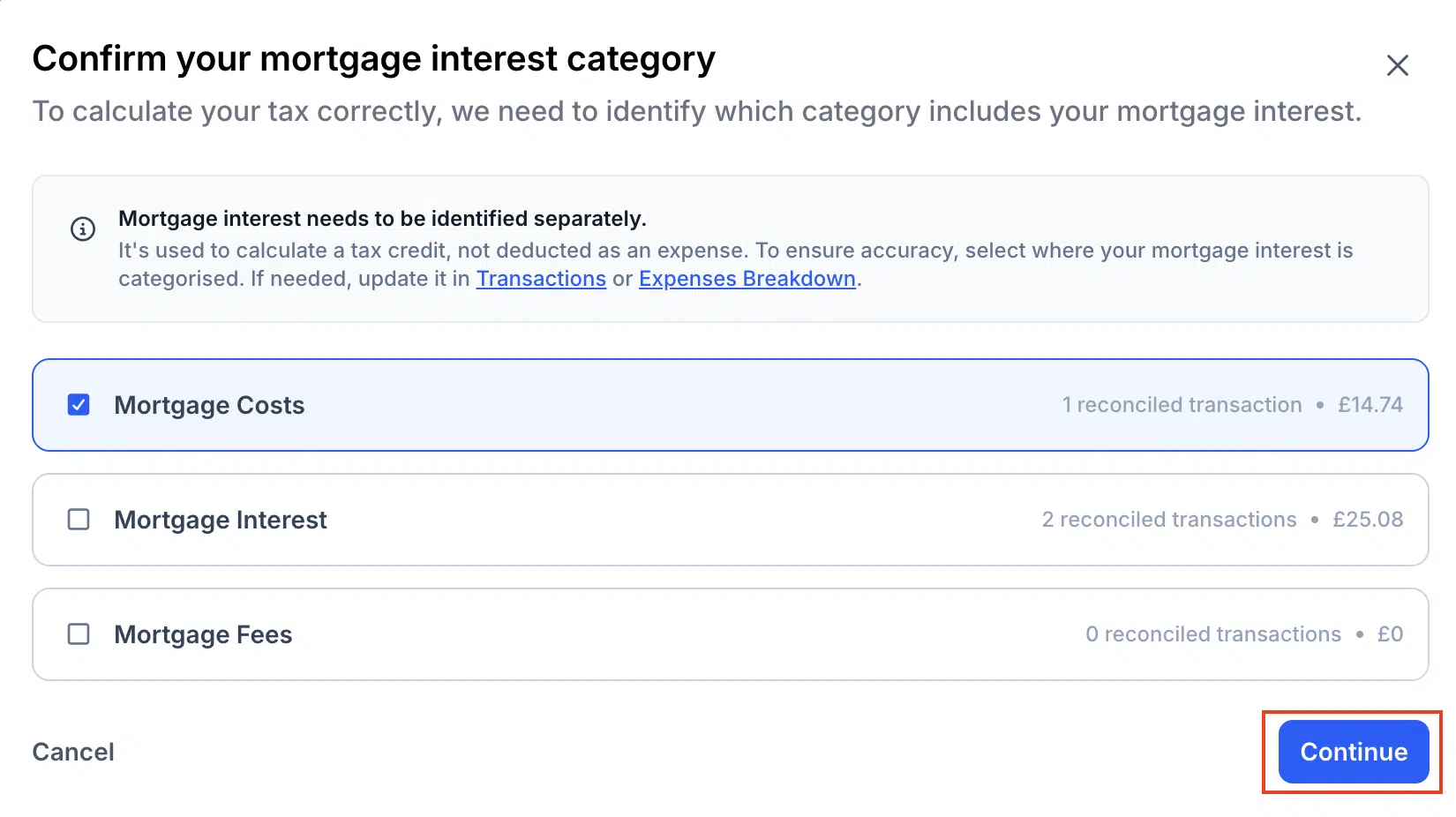
9 Select The Category That Contains Your Mortgage Interest You Can Select Multiple Categories If You Need To Then Click Continue
Confirm which category holds mortgage interest before you continue.

Step 12: Review totals and submit

Review the year-to-date breakdown. The submission is cumulative from the start of the tax year. If you see unallocated transactions, review them first. When the numbers look right, click Submit. If something is wrong, quit, fix the data, and return.
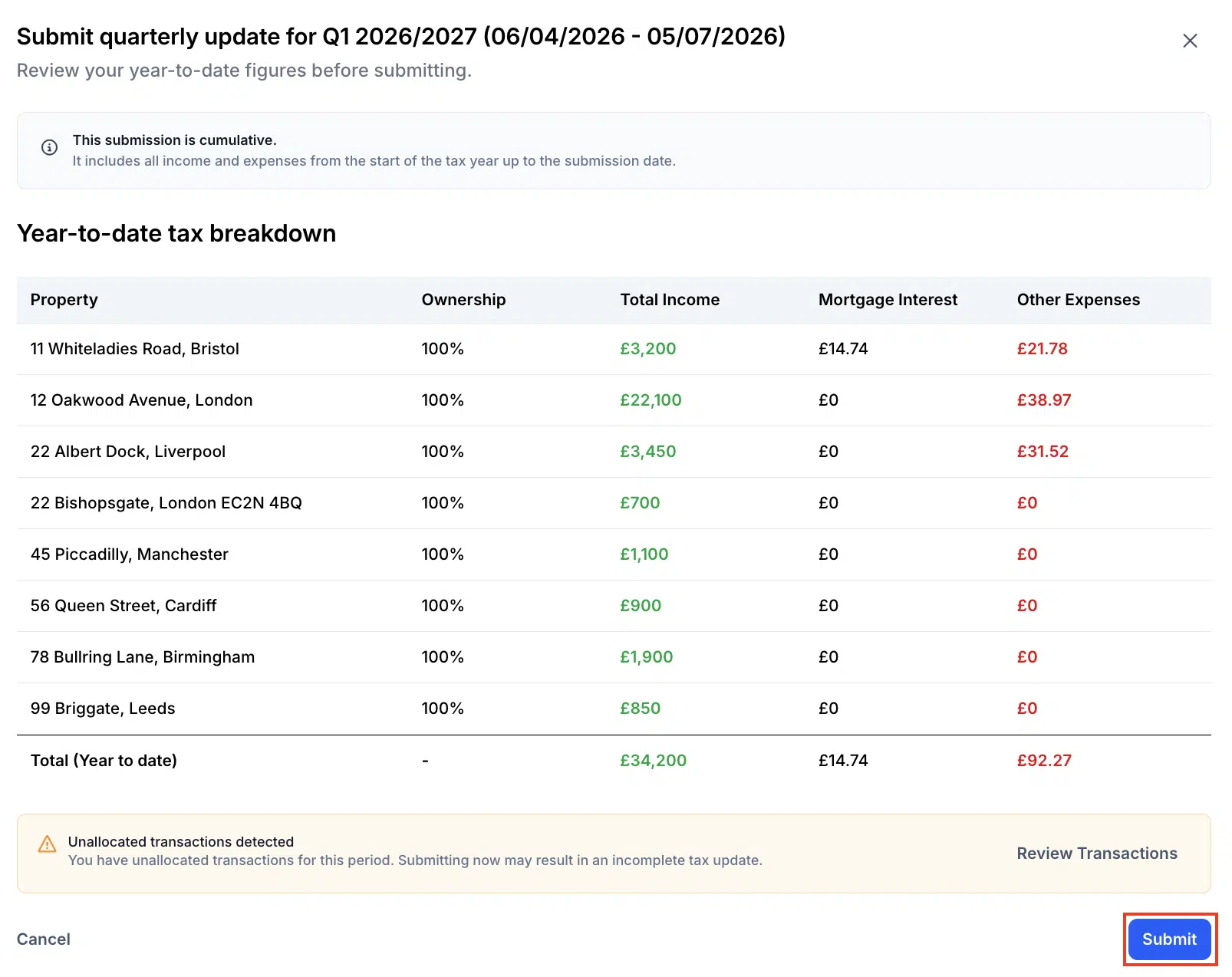
10 Review Your Numbers If Everythings Looks Good Click Submit To Finish Process

That completes the quarterly update in the MTD Hub. Keep your submission confirmation with the year-end pack, then diary the later 2026/27 deadlines.

Frequently asked questions

When is the next MTD deadline for UK landlords?

For landlords already mandated from 6 April 2026, the next quarterly deadline is 7 August 2026. It covers income and expenses from 6 April to 5 July.

What do I actually submit by 7 August 2026?

You send a quarterly update through MTD-compatible software such as the Lendlord MTD Hub. It summarises digital records for that quarter. It is not the same as the old annual Self Assessment return.

Can I submit for another team member from my Lendlord account?

You can submit for one team member per Lendlord account. If other people need to file, invite them and complete the process from their own account.

What if my numbers look wrong before Submit?

Quit the process, update the figures in Lendlord, then return to the MTD Hub and submit. Review mortgage interest categories and unallocated transactions first.

Get Q1 records tidy, then submit the 7 August update from the MTD Hub.

Explore MTD Hub

Aviram Photo

Expert insight from Aviram Shahar, Co-Founder and CEO of Lendlord · PropTech entrepreneur · Last updated July 2026

Official data sources

About Lendlord

Lendlord is a UK PropTech platform that helps property investors source, analyse, fund, and manage property deals in one place. As a direct bridging lender, it provides bridging loans from £30k to £3M at rates from 0.75% pm, with completions from 5 days and no broker fees.

The platform serves investors across the UK, US, and Canada, with tools including AI sourcing, BTL/BRRR/flip analysers, tenancy agreement generation, portfolio management, and Making Tax Digital compliance.

Lendlord is MTD-ready software for UK landlords and is approved by HMRC.

  • Commercial Property Awards 2026 Finalist
  • Property Reporter Awards 2022 Winner
  • Property Week Tech Innovation Awards 2026 Finalist

This page is informational and does not constitute financial, tax, or legal advice. Rates, rules, and thresholds change, so confirm figures with a qualified professional and official sources before you act. Your property may be repossessed if you do not keep up repayments. Rates and terms are indicative and subject to individual assessment.

As Featured In The Press

Coverage of Lendlord's Renters' Rights Act compliance tool launch - April 2026

FT Adviser

8 April 2026

"Property management and finance platform Lendlord has launched a compliance solution designed to help landlords prove they have correctly served the Renters' Rights Act 2026 information sheet, ahead of a 31 May deadline."

Read on FT Adviser

Moneyage

2 April 2026

"Lendlord has launched a new compliance solution designed to help landlords evidence service of the Renters' Rights Act 2026 information sheet ahead of the 31st May deadline."

Read on Moneyage

Modern Lender

2 April 2026

"The property management and lending platform says its new solution will support landlords in meeting their obligations under the Renters' Rights Act."

Read on Modern Lender

Mortgage Solutions

2 April 2026

"Lendlord explained that the information sheet, which was published by the government on March 20, must be provided to tenants in existing tenancies created before May 1 2026."

Read on Mortgage Solutions

Show All 14 Publications

Mortgage Strategy

2 April 2026

"Under the Act, an information sheet must be provided to tenants in existing tenancies before this comes into effect on 1st May. Landlords are expected to demonstrate it has been received."

Read on Mortgage Strategy

The Intermediary

2 April 2026

"The requirement, introduced following publication of the Government's information sheet on 20th March, means landlords must provide the document to tenants in existing tenancies."

Read on The Intermediary

Cherry

2 April 2026

"Lendlord has launched a new compliance solution to help landlords evidence service of the Renters' Rights Act 2026 information sheet ahead of the 31st May deadline."

Read on Cherry

Property Reporter

2 April 2026

"Property management platform Lendlord has launched a compliance solution designed to help landlords prove they have correctly served the Renters' Rights Act 2026 information sheet."

Read on Property Reporter

Mortgage Finance Gazette

2 April 2026

"Failure to provide the information sheet can incur fines of up to £7,000 per tenancy. Lendlord's new tool helps landlords demonstrate compliance."

Read on Mortgage Finance Gazette

Mortgage Soup

2 April 2026

"Lendlord has launched a tool to help landlords evidence Renters' Rights Act compliance, ahead of the 31st May deadline for existing tenancies."

Read on Mortgage Soup

Property Soup

7 April 2026

"Lendlord targets RRA compliance gap with proof tool, helping landlords demonstrate they have served the required information sheet to tenants."

Read on Property Soup

Bridging Loan Directory

2 April 2026

"Lendlord launches compliance tool for Renters' Rights Act, providing landlords with a way to prove correct service of the government information sheet."

Read on Bridging Loan Directory

BTL Insider

2 April 2026

"Lendlord launches RRA compliance solution, designed to support landlords in meeting their obligations under the new legislation."

Read on BTL Insider

Landlord Today

7 April 2026

"New tool geared to Renters' Rights Act information sheet - helping landlords evidence they have provided the required documentation to tenants."

Read on Landlord Today

← Back to Blog

Ready to take control of your portfolio?

Join thousands of landlords using Lendlord to manage, finance and grow their property portfolios - free to get started.